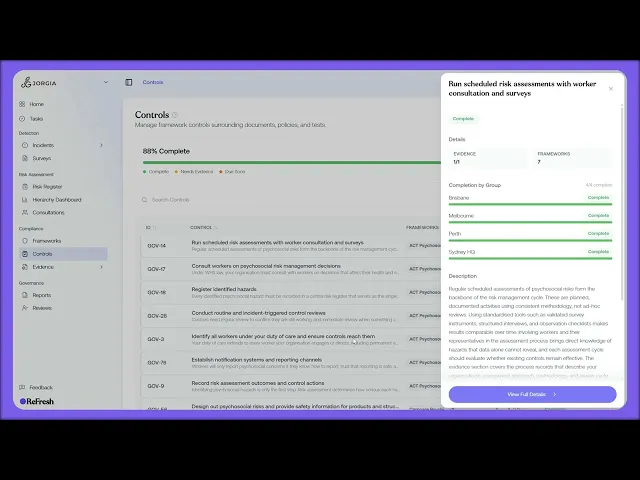
This lesson walks through the Controls register, the single source of truth for every control you operate.
What you'll cover:
Navigating and progress. Reaching the register from Compliance, Controls in the sidebar, with the overall progress bar at the top split into the same three segments as a framework view: Complete, Needs Evidence, Due Soon.
The table columns. The five columns: ID (the control code), Control (title and summary), Frameworks (what each control maps to, with an overflow count), Evidence (a progress circle), and Status (needs evidence, overdue, due soon, or complete). Click any header to sort.
Control detail. Opening a control to see its KPI strip (evidence, framework count, completion by organisation group, and description) and the frameworks it answers to.
Key takeaways:
The control register is the single source of truth for every control you operate, pulling them into one list regardless of which framework they sit under.
The Frameworks column and overflow count show how widely each control reaches, reinforcing that one control often answers several frameworks.
Status and Evidence columns let you see at a glance which controls are complete and which still need work, and sorting by header lets you focus on what matters today.
IN THIS COURSE
1
.
O7. Activating compliance frameworks
1
min
2
.
O8. Reading framework requirements and mapping your controls
2
min
1
.
O9. The control register
1
min
1
.
O10. Framework monitoring and regulatory notifications
1
min
2
.
O11. Compliance roles and target setting
2
min
1
.
O12. Shared workspaces, legal entities, and multi-group compliance
1
min

