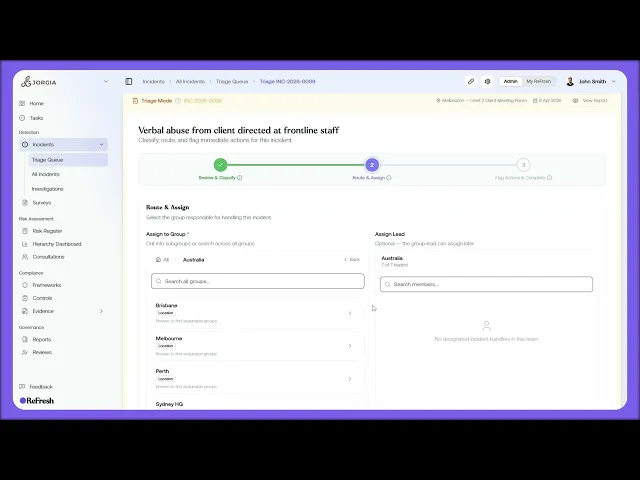
This lesson works the Incident Triage Queue, where new incident reports land for assessment. You'll open a report, classify it, route it, flag any immediate actions, and complete the triage.
What you'll cover:
The queue. Finding the Triage Queue under Detection, Incidents, with search, filter, and sort like any other list, each row an incident waiting for triage.
Step 1: Review and Classify. Confirming the incident type (Complaint, Injury or Illness, Near Miss, or Something Else) and severity (Insignificant through Catastrophic), then ticking the flags that apply: Immediate Risk, Notifiable Incident, Workers Compensation, and Restrict Access for sensitive matters.
Step 2: Route and Assign. Assigning the group responsible by drilling into subgroups or searching, and optionally assigning a Lead, with recommended Leads drawn from the group's member roles.
Step 3: Flag Actions and Complete. Picking recommended immediate actions (each creating a task for the handler group), adding any custom actions, capturing Triage Notes, and completing the triage to move the incident out of the queue.
Key takeaways:
Triage is a three-step flow: classify the incident, route it to the right group and lead, then flag actions and complete.
The flags carry real consequences, from Notifiable Incident (regulator reporting) to Restrict Access (sensitive psychosocial or harassment matters), so they're worth setting deliberately.
Recommended actions and Leads are suggested from the incident's category and the group's roles, so the system points you at the right tasks and people rather than leaving you to work them out.
IN THIS COURSE
3
.
O13. Incident reporting and triage
3
min
1
.
O14. Shareable reporting links, QR codes, and multi-channel deployment
1
min
4
.
O15. Incident handler groups, SLAs, and escalation rules
4
min
4
.
O16. Opening and managing investigations
4
min
4
.
O17. Collecting statements, managing people involved, and the investigation record
4
min
2
.
O18. Incident resolution
2
min
3
.
O19. Notifiable incidents and regulatory deadlines
3
min
3
.
O20. Worker self-service incident reporting and the portal experience
3
min

