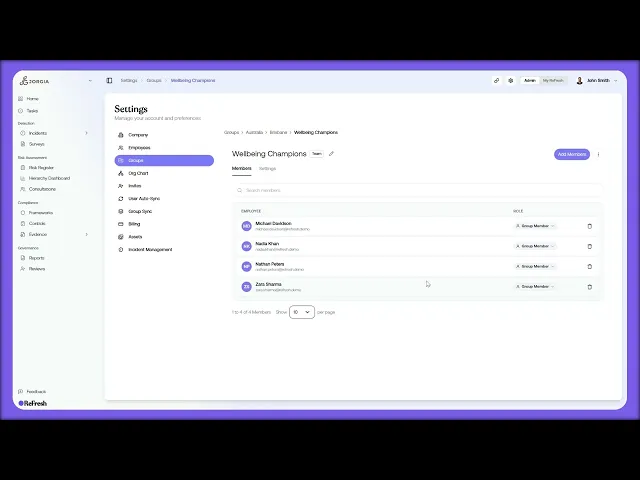
This lesson covers turning a group into an incident handler: setting response SLAs by severity and configuring what happens when one is breached. By the end you'll be able to designate any group in your hierarchy as the team that handles incidents, with defined response times and a documented escalation path.
What you'll cover:
Why it matters. Why this set-up isn't optional: your regulator expects a consistent process (defined handler, known response time, documented escalation), and SLAs with escalation stop incidents stalling when a report lands out of hours.
Members and incident roles. The Members tab and its two role attributes, Group Role (permissions inside the group) and Incident Role, with the four incident roles: Not an incident handler, Lead (primary contact and decision-maker), Handler (day-to-day investigation and tasks), and Reviewer (approves outcomes before sign-off).
The Incident Handler toggle. The Capabilities section on the Settings tab, where toggling Incident Handler on lets the group receive triage routing and auto-adds a Handles Incidents tag.
Incident SLA. The five severity tiers (Catastrophic, Major, Moderate, Minor, Insignificant), setting a response time for each, which then shows on the triage queue and is what incident reports measure compliance against.
Escalation. The three stackable options that fire on breach: Notify Lead (the quietest default), Escalate to Parent (promotes the incident up the hierarchy), and Flag on Dashboard (surfaces repeated misses for senior visibility).
Key takeaways:
The handler set-up is how you evidence a consistent incident process to a regulator: who handles it, how fast, and what happens if that time is missed.
Set every member's incident role before you go live, since you don't want to be sorting out who does what once incidents are already routing in.
The SLA section only unlocks once the Incident Handler capability is on, and the escalation rules apply to any incident routed to the group from that point forward.
IN THIS COURSE
3
.
O13. Incident reporting and triage
3
min
1
.
O14. Shareable reporting links, QR codes, and multi-channel deployment
1
min
4
.
O15. Incident handler groups, SLAs, and escalation rules
4
min
4
.
O16. Opening and managing investigations
4
min
4
.
O17. Collecting statements, managing people involved, and the investigation record
4
min
2
.
O18. Incident resolution
2
min
3
.
O19. Notifiable incidents and regulatory deadlines
3
min
3
.
O20. Worker self-service incident reporting and the portal experience
3
min

