This lesson shows you how to drill into a single hazard to understand what's driving its score.
What you'll cover:
Opening a hazard. Clicking any hazard in the Risk Profile opens a side panel with the detail.
The header. The hazard name, number of questions, number of responses, the score, the severity band, and the change since the previous survey.
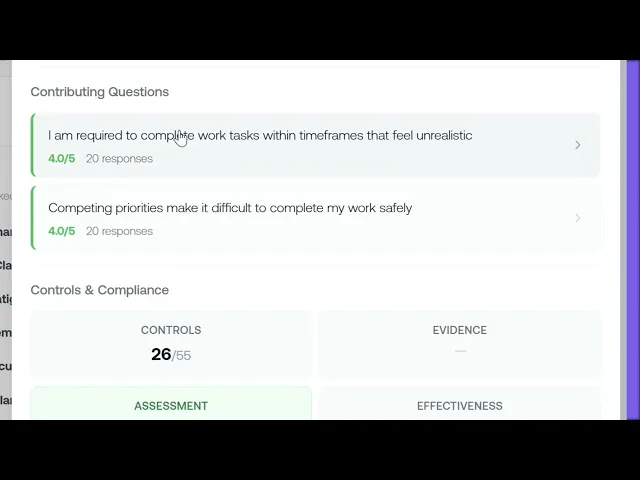
Contributing Questions. The questions tagged to this hazard with the score each one returned. Click any question to see the response distribution.
Controls & Compliance. Four cards: Controls (how many are in place), Evidence (whether they're backed by documents), Assessment (whether your rating matches the data), and Effectiveness (how well the controls are working).
Key takeaways:
Every hazard row in the Risk Profile opens into a detailed side panel
Contributing Questions show you exactly which questions are driving the score
Controls & Compliance tells you whether you're managing the hazard effectively
IN THIS COURSE
3
.
E5. How psychosocial surveys work
3
min
3
.
E6. Choosing the right survey template and designing your first assessment
3
min
1
.
E7. Distribution strategy
1
min
1
.
E8. Reading your risk profile
1
min
1
.
E9. Drilling into hazard categories
1
min
1
.
E10. Protective factors
1
min
1
.
E11. The cost impact model
1
min
1
.
E12. Survey trends
1
min

